
Checking for a Warrant in Portal
For any Portal traffic or ordinance citation, start with a phone call. Court Clerk Mike Arrieta answers at 912-865-2561, and the town's payment page lists the court address as 27209 Hwy 80 W, Portal, Georgia 30450. Ask whether Portal's court still holds the case, whether a missed date triggered a bench warrant, whether you may simply pay, and whether a personal appearance is required instead. Jot down the date and the clerk's exact words. If the case never started in town court, the Bulloch County Sheriff can help at 912-764-8888. Superior Court felony files and State Court misdemeanor records sit with the Clerk at 912-764-9009. Magistrate Court takes calls at 912-764-6458. State Court scheduling runs through 912-764-8605, and Georgia offers no single public statewide warrant search, so each office must be contacted on its own.
- Identify the ticket, case number, and likely issuing court.
- Call the Portal clerk for town traffic or ordinance process.
- Use the Sheriff for county custody or execution questions.
- Confirm a filed county case with the correct clerk or court.
- Seek legal advice before an appearance that could lead to detention.
Portal's Payment Page Is Not a Warrant Search
Portal's Government Window landing page offers three buttons: Traffic Tickets, Utility Bills, and Property Taxes. Only the first one touches a court citation at all. The page is not a warrant search. It carries no active-warrant field, says nothing about recall, lists no bond, posts no roster, and shows no sample warrant result. Vendor customer service at 1-877-575-7233 handles payment trouble, but only the Portal clerk answers the court question. A receipt proves you paid; it does not prove a warrant, a required appearance, or a court date is cleared. When a warrant is in play, ask the clerk for written confirmation.
Key point: Use Government Window for an eligible transaction, then use the Portal court clerk for legal status and next-step confirmation.
Portal Police and Municipal Court
Portal publishes no standalone police warrant portal or municipal-court records page. The best official route is the town's Government Window page, which names the court clerk and the court address. The Coastal Regional Commission lists Portal as a Bulloch County municipality, though regional and election pages cannot substitute for the town clerk. Call her office for anything warrant-related.
Portal Court Clerk
Mike Arrieta
27209 Hwy 80 W, Portal, GA 30450
912-865-2561
Bulloch County Sheriff's Office
17257 US-301 N, Statesboro, GA 30458
912-764-8888
Portal Warrant Steps After a Missed Date
Call the Portal clerk before you pay anything or drive anywhere. Give the citation number, the date you missed, and the name on the case. Then ask the direct questions: did the court issue a bench warrant or other process, is there a new date set, and may a lawyer appear for you? The payment button is not open to every citation, so do not assume it will be there. Georgia Courts reports no central traffic-citation database; local courts pick their own vendors and procedures, and online updates lag. The state guidance tells anyone who missed court to contact the issuing court directly, and it warns that showing up in person can end in custody. If the clerk confirms a warrant or cannot rule one out, get legal advice before your next move.
Portal Warrant Types
Where a warrant record lives depends on why process was issued in the first place. Portal's public web route offers only a limited municipal traffic-payment channel. County-level warrant types, from bench warrants to felony arrest warrants, must be checked with the Bulloch County offices that hold them.
| Type | Likely source | Portal resident's route |
|---|---|---|
| Municipal bench warrant | Portal court after a missed city case | Call the Portal clerk |
| County traffic process | Bulloch State Court | Call State Court or Clerk |
| Arrest warrant | Magistrate or another authorized court | Call Sheriff and issuing court |
| Superior felony process | Superior Court | Call the Clerk |
| Search warrant | Authorized judge in an investigation | Expect investigative access limits |
Portal's Sparse Web Route
Portal counted 638 residents in the 2020 Census across roughly two square miles of land. A town this size has a thin web presence, so a clerk phone call beats any online hunt. Treat the lack of a public warrant search as an access limitation, nothing more; it is not proof that no town warrant or case exists. Skip private directories, national ticket sites, and people-search results, too. Those can be stale, can match the wrong person, and cannot confirm a recall. The published Portal clerk route and the right Bulloch County agency remain the safe sources.
Inside a Portal Warrant Record
Portal posts no public sample warrant listing. So ask questions rather than expect guaranteed fields: the name on the case, the citation or case number, the issuing court, and the warrant's status. Whatever a personal inquiry turns up, keep private details like birth dates, addresses, and unverified claims out of public view.
| Source | Portal court, another issuing court, or the Sheriff. |
|---|---|
| Case number | A clerk identifier, safely shown as CASE-NUMBER. |
| Warrant type | The exact term used by the court. |
| Reason | A missed date, charge, or other releasable basis. |
| Issue date | The official date, if public. |
| Status | The custodian's answer as of the check date. |
| Bond or hold | Only if the court or Sheriff releases it. |
| Next step | Payment, appearance, or other authorized instruction. |
Keeping a Portal Payment Trail
If the clerk authorizes payment, use the Portal traffic-ticket route and keep the vendor receipt. Write down the citation number, the date paid, the amount, and the transaction confirmation. Then confirm with the clerk that the payment closed the whole case, that no court appearance remains, and that any bench warrant or DDS notice was recalled. Vendor support can explain a declined card, not a judge's order. A receipt is evidence of payment and nothing more. If the portal fails, call the clerk instead of wandering onto commercial sites. Portal publishes no warrant recall fee, bond schedule, payment plan, walk-in program, or amnesty; the court sets whatever terms apply.
How Portal Warrants Fit the County System
A Portal municipal case starts in the town court. Felony and serious misdemeanor papers live elsewhere. The Bulloch County Sheriff executes criminal process within its authority, and the county Clerk holds the Superior felony and State Court misdemeanor files. Magistrate Court takes probable-cause applications, preliminary hearings, first appearances, and certain bonds. GCIC belongs to Georgia law enforcement. It is not a public website. Because of that split, one Portal ticket can leave three trails: a payment record with the town, a Sheriff execution record, and a filed court record, each answering a different question. An Ogeechee Circuit order requires served warrants to be filed with the proper county clerk within five days, which explains timing gaps. The Bulloch County warrant records overview lays out the county-wide routing.
Portal Residents and Open Records
Start with the right custodian. For Portal town records, ask the Portal clerk who currently serves as custodian, and request existing records rather than a newly created “all warrants” report. A Portal open-records request should seek what the office actually keeps. Sheriff records move through the official form, which directs requests to openrecords@bullochsheriff.com and designated officer Emily Sims. The Sheriff notifies a requester within three business days whether responsive records exist and are available, unavailable, or exempt. Expect possible charges. Search, retrieval, redaction, copying, and supervision fees can all apply. Georgia law permits withholding or redaction of sealed matters, juvenile information, confidential investigative facts, sources, victims, and unexecuted operations. Keep the request narrow. Identify the requester or the case, and acknowledge the lawful limits. The Clerk of Superior, State & Juvenile Courts runs a separate public-record route for filed county cases. Its guidance asks for the name and case number when known, plus contact information. Processing generally runs three to five business days. That range is no promise of current warrant status, though. Ordinary Clerk copy fees are published, but Portal's sources state no warrant-specific fee. Ask for a cost estimate when staff time, copying, certification, or redaction may be needed. Before choosing a custodian, sort out whether the item is a town court record, a Sheriff execution record, or a filed county case. A concise request routes faster in Portal and avoids asking for a compilation no agency maintains.
Public Access to Portal Warrant Records
Georgia's Open Records Act supports access to existing records. What you receive still depends on the custodian and the exemptions. A Portal municipal court record is not automatically a Sheriff record. A live investigation differs from a court docket. Ask which entity holds the exact document before submitting a Portal request.
Access rule: The Georgia Attorney General's guidance explains response timing, fees, and redactions, but it does not create a public warrant database.
Access does not permit republishing private identifiers or allegations. Use what you find to understand and resolve your own or a relative's Portal record through the proper court.
The Official Portal Ticket View
The Portal Government Window page lists the town contact and a Traffic Tickets button. That is the official Portal payment entry point.
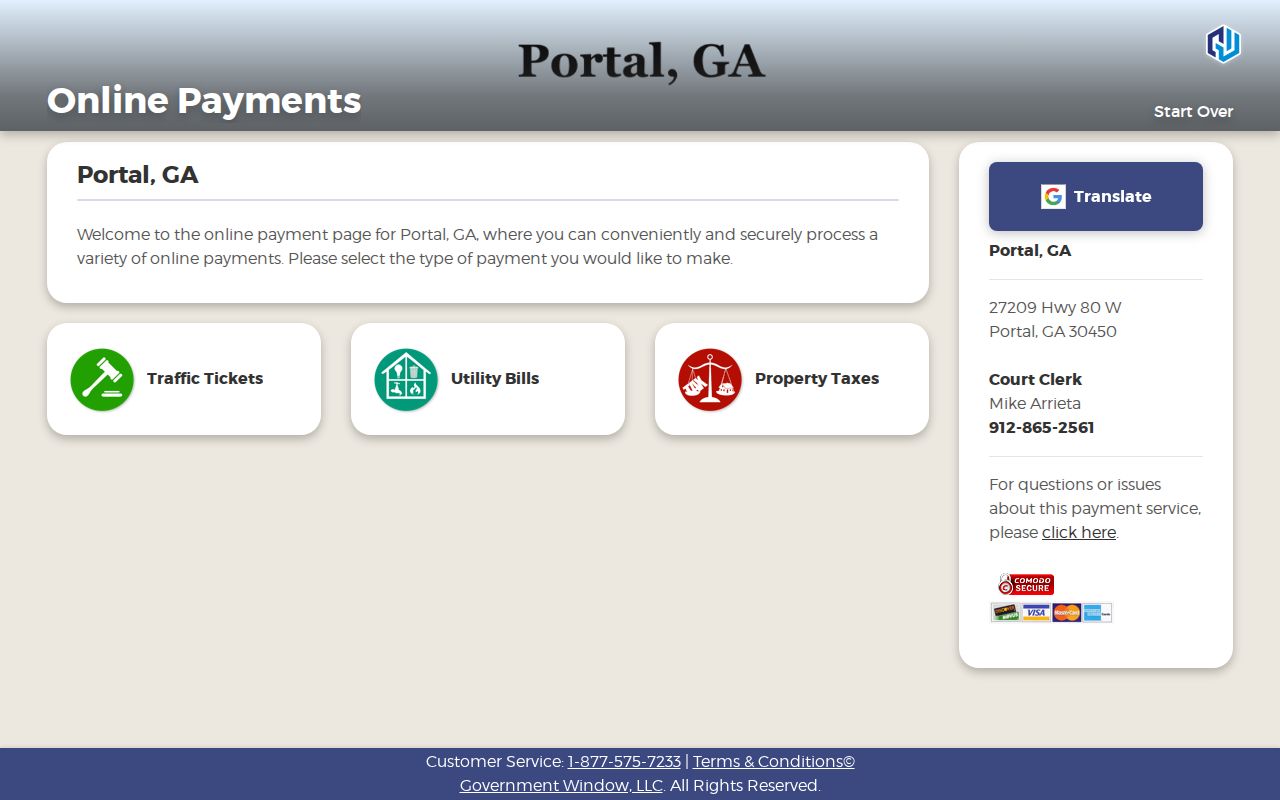
This route supports payment only. It offers no warrant-name search, active roster, recall instruction, or warrant result for Portal cases.
Resolving a Portal Warrant Safely
If the Portal clerk confirms a warrant in a Portal case, get the exact warrant type, issuing court, case number, and authorized next step. Talk with an attorney before you appear. What happens next depends on the order. A court may require an appearance, accept an eligible payment, set a new date, address bond, or weigh a proper request to recall or quash process. None of that is automatic. Do not contact a complainant or interfere with evidence. A vendor receipt does not lift a Portal warrant by itself. Keep every record. Ask for written confirmation, and follow the court's instruction. Call 911 for an emergency. For a county custody question, use the Sheriff, not the vendor help desk.
Important: Confirm the Portal court's instructions and obtain legal advice before any visit that could result in custody.